Back in May in The Verifiability Gap in Production Engineering I argued that production engineering doesn't fit the way LLMs have eaten coding. The short version: coding works because it's verifiable. You can compile it, run the tests, and get a cheap pass-or-fail signal a machine can score a million times, which is what made Reinforcement Learning from Verifiable Rewards (RLVR) work. Production engineering fails that test. Correctness is multi-dimensional and time-dependent, the signal usually arrives through incidents, and there's no cheap automated reward to train against. I wrote that post from the position of a production engineer at Crusoe, and this follow-up keeps the same vantage.
When I got to simulation in that post I waved it away in a sentence. A high-fidelity simulator or digital twin, I wrote, runs into the trouble that the simulator's own "process model becomes a problem in its own right", and I left it there. That's true as far as it goes, but it wasn't the full picture. I'd written the process model down as a cost (expensive to build, hard to keep faithful) without noticing that the same sentence describes the opportunity.
I'd already accepted a milder version of the idea in that post, under the name manufactured verifiability: canary analysis and progressive rollouts take a non-verifiable action, a deploy, and approximate a pass / fail signal by exposing it to a slice of traffic and comparing statistics. A simulator is that move but taken further. Instead of approximating the check in production, you build the environment outright and let it hand you the reward. A simulator for operations could be designed as a reward factory, not as a prettier staging environment. The reason I keep coming back to it is an analogy from somewhere else entirely.
How a car learns to drive
A self-driving stack can't learn to perceive and act only by racking up dangerous miles in reality; the situations that matter most, the child stepping out from behind a parked van, are the ones you can't ethically wait around for. A robot can't learn to grasp only by breaking ten thousand real grippers. So a large part of the useful learning and evaluation happens in simulated worlds (a driving world like CARLA, a physics world for manipulation), acting millions of times, cheaply, safely, and repeatably, then transferring what was learned back to reality.
The thing being built is a world model: a representation of how the environment behaves, complete enough that an agent can act inside it and learn which actions lead where. Two properties make it work for training:
- Ground truth: because the simulator defines the dynamics, it knows the true state and the true outcome of an action, so the feedback is exact and free, and free in a way real perception data is not.
- Transfer: if you add domain randomisation to vary the world model aggressively enough, then the simulated reality starts to look like one more sample from your distribution, so the idea carries over.
The breakthrough here was to build a world to learn in rather than collecting more real-world data.
Why not just replay your incidents?
The obvious objection is that operations does have real data, so why simulate? A real incident records a lot: the metrics and logs as they looked at the time, the actions the on-call actually took, and once the postmortem lands, an agreed root cause. The postmortem is also the verifier. If you treat the whole thing as a trajectory of state, actions, outcome, and verified cause, then you have a reward signal scraped straight from your own incident history with no simulator required. This is the replay route to verifiable rewards, and on paper it works.
However, it dies on volume. Incidents are rare (or they should be), and the entire SRE role is to keep them that way. A well-run service might produce a couple of dozen postmortems worth the name in a year, against the millions of verifiable problems that trained the coding models. You can't fine-tune on two dozen of anything. The property that makes a system healthy (few incidents) is the property that starves the training loop, which is a slightly perverse place to end up. It's the same reason you don't train a self-driving stack on real crash footage alone: the events that teach the most are the ones you've worked hardest to make rare.
So replay hands you verifiable rewards and nowhere near enough of them.
An artificial systems model
Replay fails on volume; trying to manufacture more by acting on production fails on danger, which is the verifiability gap restated: every attempt costs real traffic, real time, and real production impact. Chaos engineering is the disciplined version of that bet (DiRT, game days, deliberate fault injection): it does manufacture labelled failures faster than waiting for them, but it still plays out in live production, and only ever covers the faults you already thought to inject. The robotics answer to both at once is to stop trying to learn only in reality and build a model of it instead.
The operations version of a world model is an artificial systems model: an executable model of your production environment (services, dependencies, queues, caches, saturation curves, failure propagation) emitting plausible telemetry into a fake observability stack, with a fault injector on top. Expire a certificate at 02:00, partition a network, leak a connection pool, ship a bad config, start a slow memory creep that pages someone in four hours.
How literal that model is sits on a range. At one end it's a discrete-event simulation: a graph of queues, capacities, and error rates with the dynamics worked out in maths, cheap enough to run millions of episodes but blind to anything it has no variable for, such as a kernel panic, memory corruption, or a bug in the code itself. At the other end it's real microVMs emitting real kernel and application metrics, faithful but far too slow and costly to train against at that volume. The more abstract you make the model, the more failure classes it can't represent at all, which is the coverage limit again, one level down.
Because the systems model defines the dynamics, it knows the true root cause and the true effect of every action, which it computed itself. In real incidents the root cause is contested, written up days later, and often never fully agreed. In an artificial systems model the label is exact. That is precisely the reward my verifiability gap post said production couldn't supply in the wild, but we can manufacture it in a simulated world.
If you strip the framing away it looks like a Reinforcement Learning (RL) environment:
- observation space: telemetry
- action space: the runbook (query a dashboard, read a log, roll back a deploy, drain a node or page a human).
- reward: scored against ground truth the model already holds.
The loop looks like this:
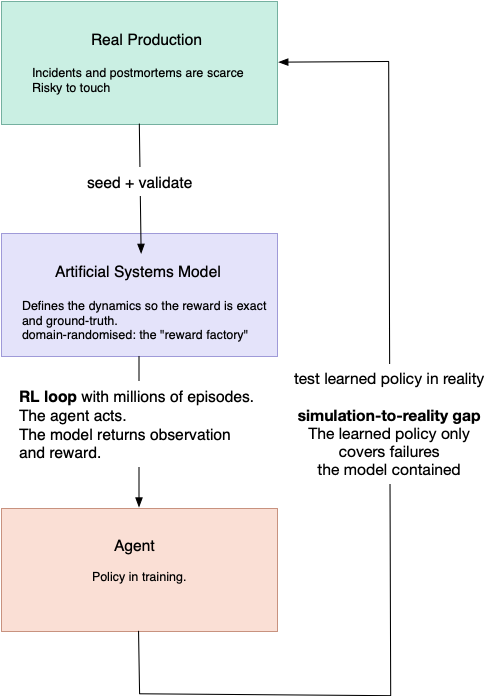
This is model-based RL pointed at operations. It's also the harness argument I've made before applied to training rather than serving: the model is the engine, the systems model is the world it drives in.
The reward is where it gets tricky. STPA, or System-Theoretic Process Analysis, is Nancy Leveson's method for looking at accidents as failures of control, not just as broken components. One of its useful ideas is the unsafe control action: a controller can act too soon, too late, not at all, or in the wrong context, and make the system less safe even if each component did what it was told. Optimise time-to-mitigate (MTTM) naively and you'll train an agent that finds the fastest way to make an alert stop firing, which is to silence the alert. It resolved the incident, technically. That's an unsafe control action in Leveson's sense, the cheapest path to a green dashboard, which is exactly the class of thing STPA exists to catch.
Manufacture the reward badly and you manufacture the wrong operator.
Why I was sceptical, and still partly am
This is where the phrase "process model" comes back, and STPA puts it at the dead centre.
In STPA, every controller acts on its own picture of the system's state (its process model) and the unsafe control actions come from that picture being incomplete or wrong, not from a broken part. Correctness is a property of the live control loop, not of any single artifact. An artificial systems model is a single artifact. It is a process model written down and made executable. So an agent trained inside it inherits the blind spots of that model. It will learn to handle every failure mode you knew to put in the world, flawlessly, and the incidents that actually page you are the ones your model didn't contain.
World models are good at interpolating within their training distribution and poor at the genuinely novel. In operations, the genuinely novel part is usually where the cost is.
Take the 2017 AWS S3 outage as an example. A systems model built from the known playbook would faithfully simulate removing N servers from a subsystem. It would not contain the undocumented coupling that let a mistyped command cascade into the index and placement subsystems, because nobody had written that coupling down. The gap that caused the incident is, by definition, the gap your model doesn't have.
Observation: A robot learns to see in a simulated world; an operator would learn to act in a simulated system. The ceiling in both cases is the fidelity of the model, and the failures that matter most live just above it.
A car's simulator has stationary, known physics; gravity doesn't get refactored next sprint. A production environment drifts continually as the codebase that defines it is rewritten week to week, and its worst failure modes are the ones nobody knew about. That's the real simulation-to-reality gap for operations: the model can only ever contain the failures someone already understood well enough to build into it.
That gap is widest exactly where operations is growing fastest. The LLM-rate production infrastructure (GPU fleets, interconnects and inference stacks that serve the agents) is the least charted environment we run, and the one changing quickest on both sides: new hardware generations underneath, a software stack that turns over month to month above. My experience at Crusoe so far is that this churn is normal operations, not a phase you can wait out.
A systems model has to be built from a corpus of understood, written-down failures. A domain moving this fast has not accumulated much of that corpus yet, and keeps invalidating the little it has. The car analogy breaks down completely: it isn't just that the code gets refactored next sprint, the hardware does too. It's the one place where neither escape route works: it is both too new for replay to have the volume and too unstable for a model to stay faithful. However, this remains where the whole industry is rushing.
What it does change
Not nothing: this approach widens the verifiable slices.
My earlier post argued that the verifiable bits of production engineering (SLO maths, error-budget arithmetic, config linting) are where AI tooling lands first and that does not change.
An artificial systems model extends that set to every failure mode you understand well enough to model: cert expiry, disks filling, pool exhaustion, a bad config you can roll back. All of it becomes generatable and scoreable at scale, with domain randomisation over topologies, latencies, and telemetry gaps so the agent doesn't just memorise one fake datacentre. That's not the judgement-heavy core of the role, but it's a larger foothold than I allowed for, and it moves the open question. Less "Is operations verifiable at all?" and more "How good is your systems model, and how far does its coverage reach before it stops matching production?" This is a measurement problem production engineering doesn't yet have a good answer to.
What already exists
None of the pieces here are new on their own. Microsoft's AIOpsLab and IBM's ITBench both deploy real microservice systems, inject faults, generate load, and export telemetry, then score an agent against a known answer. Training a policy in a simulator and transferring it to a real system is a standard move in robotics, and it already shows up for narrow operations tasks: microservice rescheduling, autoscaling, cloud security policy, network optimisation. Sim-to-real and domain randomisation are mature ideas, and verifiable rewards are now familiar from coding and maths. What I haven't found is the combination, a synthetic systems model used to train against the judgement-heavy core of operations rather than the bounded slices, framed as manufacturing the reward the verifiability gap withholds.
The distinction that matters is train versus evaluate. AIOpsLab and ITBench are evaluation harnesses: they measure how an agent does against a fault someone injected, and they mostly test LLM agents reasoning at inference time, not a policy trained inside a world model. The ITBench results are a warning for anyone who tries the training version: frontier models score below half on the SRE incident tasks, and some of the agents that investigate most aggressively start mistaking the fault-injection setup itself for the cause. That is the coverage problem from earlier: the agent learns the seams of the simulated fault, not the fault. Build a world like that to train in and that is the failure mode waiting for you.
The nearest live instance, though, isn't a simulator at all. Google's recent writing on AI in SRE builds its verification straight from production: curated golden incidents with known answers, an LLM-as-a-judge scoring the investigation trajectory, and deterministic scoring reserved for the final mitigation, which they treat as a choice from a bounded catalogue (roll back, drain, upscale). That's the same move of manufacturing the reward that I'm describing, only situated differently. Staying inside real data avoids the simulator coverage gap, but it inherits replay's volume problem (golden incidents are human-labelled and scarce) and only pays off because Google has the incident scale to A/B-test a change and read the result.
A simulator is the move you make when you don't have that scale: it manufactures the volume real data won't, and pays for it in coverage. The honest accounting doesn't spare Google either: their measured wins land on the verifiable slice (detection, enrichment, surfacing hypotheses), not the judgement slice this post is about. It isn't just Google; Honeycomb describe almost the same eval architecture in the application space, so that shape is something you converge on once the verifiability gap bites.
Who gets to build the model
A systems model is only as good as the operational corpus behind it: real telemetry, postmortems, architecture diagrams, incident transcripts. That should sound familiar, because it's the same data moat I described in AI for Production Engineering - Who Gets to Build It. The operations capture wave (bots transcribing every incident call) is a partial specification for the systems model, narrated in real time by the people holding the process model in their heads. Whoever owns the corpus can model the most realistic production. The advantage compounds in the place it already did, with one caveat from earlier: in a substrate that turns over as fast as AI infrastructure, the operational corpus will age almost as quickly as it is added, so the moat is real but shallower there than over a stable system.
What would need to be true
I haven't built this, so it's a sketch, not a result. A few things would have to hold:
- Reward design. The naive metrics are all hackable, and this is the critical part. I don't think it's solved and I am not a machine learning expert.
- Measured transfer. Robotics has numbers for simulation-to-reality success. Ops has none. Until you can say how a model-trained agent does on real incidents, you're guessing.
- Bootstrapping the model. The systems model's behaviour comes from somewhere, which means the better your postmortems, the better your artificial production; an annoying dependency for most organisations to discover they have. The replay trajectories that were too scarce to train on find their use here: precious as seed and as the set you validate the model against, just useless as a training corpus on their own.
- Known failures only. Domain randomisation generalises across the parameters of a known model, not across couplings and failure modes the model never represented. We'd be training on the failures we already know how to describe.
Thoughts
The pattern I keep returning to: when a field can't get cheap, verifiable feedback from the real world, it builds a model of the world and learns there instead. Self-driving did it, robotics did it, and it works because the model hands you the ground truth reality won't. Operations has the same trap (the one I spent a whole post describing) and an artificial systems model is the same escape, with the same catch.
It doesn't close the verifiability gap. It relocates it, and relocation is the recurring shape of this whole problem: verification keeps moving, from the artifact you can compile and test, to the eval harness, to production telemetry, and here to the coverage of your systems model. Each step buys a cheaper signal and pays for it somewhere new; this one pays in model coverage, which is probably the most honest thing you can say about applying AI to operations: not that it can't be done, but that it can only be done as well as you've modelled your own system. That's a sharper constraint than it sounds, and a more useful one than "impossible".
Worth a prototype, if only to find out where the model stops matching the system.
References
- AIOpsLab
- AIOpsLab: an evaluation framework for AIOps agents that deploys microservice systems, injects faults, generates load, exports telemetry, and scores agents. Microsoft Research: https://www.microsoft.com/en-us/research/blog/aiopslab-building-ai-agents-for-autonomous-clouds/
- Paper: https://arxiv.org/abs/2501.06706
- CARLA https://carla.org/
- Google: Papapanagiotou, Malesevic, Heiser & Meshenberg, AI in SRE: How Google is Engineering the Future of Reliable Operations. Manufacturing verification from production: golden data, an LLM-as-a-judge on the investigation trajectory and tool calls, and strict deterministic scoring on the final mitigation. https://sre.google/resources/practices-and-processes/ai-engineering-reliable-operations/
- Majors, Fong-Jones, Miranda & Parker, Observability Engineering: Achieving Production Excellence, 2nd ed (O'Reilly, 2026), ch. 21 "Observability for Large Language Models". The eval flywheel: golden data, deterministic scoring on the factual slice, LLM-as-a-judge plus human sampling on the trajectory. https://www.oreilly.com/library/view/observability-engineering-2nd/9781098179915/
- ITBench
- Code: ITBench, a benchmark for IT-automation agents on fault-injected Kubernetes systems: https://github.com/itbench-hub/ITBench
- Paper: Jha, Arora, Watanabe et al., ITBench: Evaluating AI Agents across Diverse Real-World IT Automation Tasks https://github.com/itbench-hub/ITBench/blob/main/it_bench_arxiv.pdf
- ITBench-AA: the SRE results showing frontier models below 50% on incident tasks (Artificial Analysis with IBM): https://huggingface.co/blog/ibm-research/itbench-aa
- Domain randomisation: Tobin et al., 2017, Domain Randomization for Transferring Deep Neural Networks from Simulation to the Real World (arXiv:1703.06907). https://arxiv.org/abs/1703.06907